A computer is like a smart machine that helps us learn, play games, watch videos, and do homework. But just like our body has different parts (eyes, brain, hands), a computer also has many parts that work together.
Let’s learn about different parts of a computer in a fun and easy way!
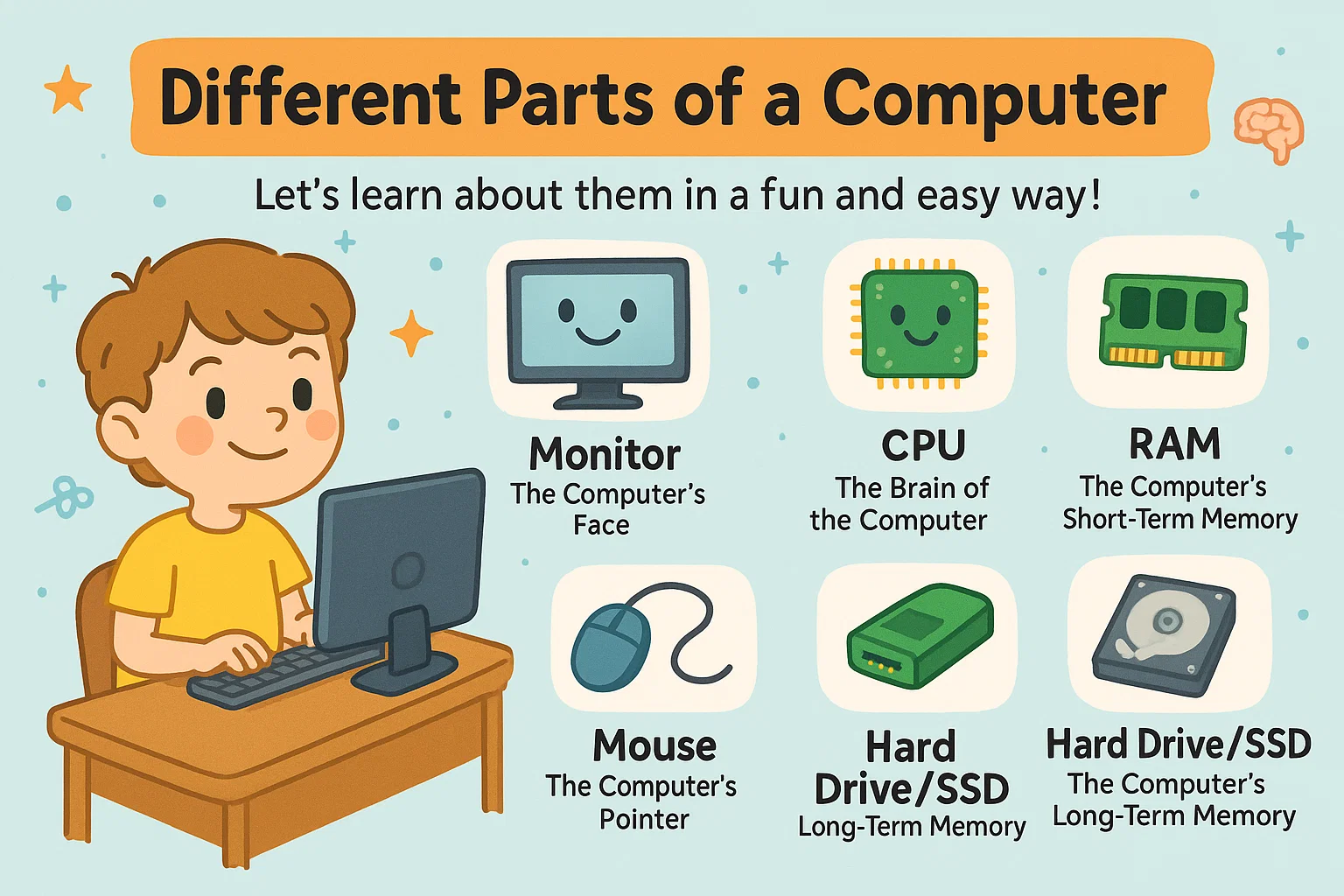
🌟 1. Monitor – The Computer’s Face
The monitor is the screen of the computer. It shows everything — pictures, games, videos, and text.
📌 Think of it like a TV where you can see what the computer is doing.
🎹 2. Keyboard – The Computer’s Hands
The keyboard has many buttons called keys. You use it to type letters, numbers, symbols, and commands.
📌 It’s like the computer’s hands that help it write and talk to you.
🖱️ 3. Mouse – The Computer’s Pointer
The mouse helps you point, click, drag, and select things on the screen.
📌 It’s like your finger for the computer. Wherever you move the mouse, the arrow on the screen moves too!
🧠 4. CPU – The Brain of the Computer
CPU stands for Central Processing Unit. It is the most important part because it:
✔ Thinks
✔ Solves problems
✔ Runs programs
✔ Tells all other parts what to do
📌 Just like your brain controls your body, the CPU controls the whole computer.
🗂️ 5. RAM – The Computer’s Short-Term Memory
RAM stores information only while the computer is ON.
📌 Imagine your brain remembering a phone number only for a few seconds — that’s how RAM works!
When the computer turns off, RAM forgets everything.
💾 6. Hard Drive / SSD – The Computer’s Long-Term Memory
This is where all your files stay:
- Photos
- Videos
- Games
- Homework
- Music
- Apps
📌 Even when the computer is turned off, it remembers everything stored here.
🎧 7. Speakers – The Computer’s Voice
Speakers help the computer make sounds:
- Music
- Video sounds
- Game sound effects
- Voice recordings
📌 They help the computer talk to you!
🖨️ 8. Printer – The Computer’s Printer Friend
A printer takes what’s on your screen and puts it on paper:
- Drawings
- Photos
- Homework
- Worksheets
📌 It’s like the computer’s colouring and writing machine.
🎤 9. Microphone – The Computer’s Ears
A microphone lets the computer hear your voice.
📌 When you speak into the mic, the computer listens — just like Alexa or Siri!
📸 10. Webcam – The Computer’s Eyes
A webcam is a tiny camera that:
- Takes photos
- Records videos
- Lets you join online classes
📌 It works like the eyes of the computer.
🌐 11. Wi-Fi / Internet Parts – The Computer’s Connection to the World
These help your computer connect to:
- Websites
- Online games
- Videos
- Online classes
📌 It’s like giving your computer a magic door to the whole world!
🔌 12. Power Supply – The Computer’s Energy Source
Just like you need food, a computer needs power. The power supply sends electricity to all parts.
📌 Without it, the computer cannot wake up!
🛠️ 13. Motherboard – The Computer’s Main Body
The motherboard is a big board inside the CPU cabinet.
It holds and connects:
- CPU
- Memory
- Storage
- Graphics
- All other parts
📌 Think of it like the computer’s skeleton that holds everything together.
🕹️ 14. Special Computer Helpers (Peripherals)
These are extra tools you can add:
- Headphones
- Touchscreen
- Joystick
- Drawing tablet
- External hard drive
📌 They make the computer even smarter and more fun!
People Also Read:The Ultimate Kids Guide to the History of Computers
🧩 Putting It All Together
A computer works just like a team. Each part has a special job:
| Part | Job |
| Monitor | Shows pictures and videos |
| Keyboard | Types letters and numbers |
| Mouse | Helps you click and move |
| CPU | Thinks and controls everything |
| RAM | Remembers things for a short time |
| Hard Drive/SSD | Stores things for a long time |
| Speakers | Makes sound |
| Microphone | Listens to you |
| Webcam | Lets you be seen |
| Printer | Puts things on paper |
| Wi-Fi | Connects to internet |
| Power Supply | Gives electricity |
| Motherboard | Connects all parts |
🎉 Conclusion: Computers Are a Team!
All these parts work together just like the parts of your body. When they cooperate, the computer becomes a powerful, helpful machine — perfect for learning, playing, creating, and exploring.