Table of Contents
Making Your Own Game: What Does It Mean? Where to Begin When Your Child Wants to Build Their Own Game How to Make Easy Games for Kids What Is the Easiest Game to Code for Kids? Quick Game Ideas Kids Can Build Best Tools to Help Your Child Build Their Own Video Game 5 Great Reasons for Kids to Build Their Own Game How Kids Learn to Code While Building Games Final Thoughts Frequently Asked Questions
Making your own game for kids is easier than you think – even beginners can build a real, playable game using easy tools and step-by-step guidance. In this guide, we will cover quick game ideas like quizzes, mazes, and clickers, then show how to level them up with scores, power-ups, and new stages.
We will also cover the easiest game types and how to add cool upgrades like levels and power-ups. The goal is simple: finish a first playable version quickly, feel proud, and then improve it – one small upgrade at a time. By the end, your child will not just play games – they will have one they can proudly share.
Making Your Own Game: What Does It Mean?
Making your own game means your child creates a playable game with rules – like scoring points, reaching a goal, or avoiding obstacles. They do not need complex code on day one; many tools use drag-and-drop blocks that feel like puzzle pieces.
The best beginner games are small and finish able, so kids feel success quickly and stay motivated. Once the first version works, your child can improve it by adding levels, sound, animation, and challenges.
A Toy Project vs. a Real Project
A real project has a goal, rules, and a win or lose moment – even if it is simple. This is what makes kids say, “I made this,” instead of “I followed a tutorial.” That is the true spirit of making your own game for kids.
Where to Begin When Your Child Wants to Build Their Own Game
Start with what your child already loves: racing, puzzles, trivia, stories, or adventure games. Pick one tool and one small goal, like “a game that takes 30 minutes to build.” Use a simple plan: idea → build → test → fix → share. Keep it light – version 1 is not meant to be perfect; it is meant to be playable.
✅Beginner Checklist
Choose based on your child’s age, reading level, and the device you will use (tablet or laptop). Then pick one game type they will enjoy building, not just playing.
How to Make Easy Games for Kids
This is the easiest way to make your own game for kids without getting stuck. Each step is small, clear, and beginner-friendly – perfect for first-time creators. Kids learn by trying, testing, and fixing, which is how real game studios work as well. By the end, your child will have a playable game they can show others.
Step 1: Pick a Game Type
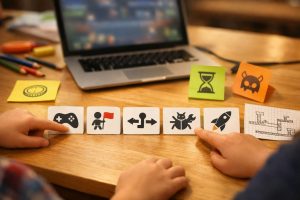
Pick one: clicker, quiz, maze, racing, platformer, or story game. The best first choice is the one your child can explain in one sentence.
Step 2: Build the First Playable Version
Add one character, one goal, and one rule (win or lose). If the game works in five minutes, you are doing it right.
Step 3: Add Rules
Use simple logic like “If you touch the coin, score plus one.” Rules are what turn a simple project into a real game-building experience.
Step 4: Test and Fix Bugs
Tell your child to “break the game on purpose” to find problems. Fix one bug, test again, and celebrate the improvement.
Step 5: Make It Cooler
Add one upgrade: a new level, a timer, a power-up, or a harder enemy. Small upgrades keep kids excited without overwhelming them.
What Is the Easiest Game to Code for Kids?
The easiest games to make for kids are the ones with fewer characters and fewer rules. Clickers, quizzes, and simple mazes are great because kids finish them more quickly. They also teach key skills like events, score tracking, and step-by-step logic. If your child’s goal is to make their own video game quickly, start here.
Top 3 Easiest Game Ideas for Kids
- Clicker game: Tap or click to collect points and unlock upgrades.
- Quiz game: Choose the right answer and get instant feedback.
- Maze game: Reach the goal while avoiding walls or obstacles.
🎮🕹️👾Quick Game Ideas Kids Can Build
Parents love this part because it helps match the idea to the child’s interests. Kids love it because it feels like choosing a mission, not doing homework. Each idea below is beginner-friendly and finishable with simple tools. Pick one and start building today.
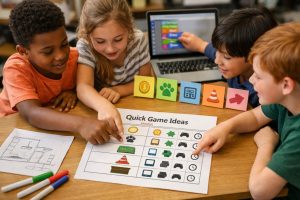
Make Your Own Video Game For Kids: Game ideas table
| Game Idea | Best For | Tool to Use | Time to Build |
| Clicker “Coin Collector” | Beginners | Scratch | 30–45 min |
| Quiz “Guess the Animal” | Trivia lovers | Scratch / Code.org | 30–60 min |
| Maze “Escape Room” | Puzzle fans | Scratch | 45–90 min |
| Racing “Dodge the Cones” | Action kids | Scratch | 60–90 min |
| Platformer “Jump Quest” | Gamers | Scratch / Tynker | 90–120 min |
Best Tools to Help Your Child Build Their Own Video Game
A common mistake parents make when helping their child make your own game for kids is choosing too many tools at once, which can be confusing. Instead, choose one based on your child’s age and how much guidance they need. The options below are popular, beginner-friendly, and easy to start with. They make it simple for your child to build their own game without feeling stuck.

1. Scratch
Scratch uses drag-and-drop blocks, so kids build games without typing code. It is perfect for ages 8 and up and great for sharing games with friends.
2. Code.org
Code.org feels like a puzzle game that teaches coding step-by-step. It is great for beginners who like structure and clear directions.
3.Tynker
Tynker offers polished game paths and templates for faster wins. It is helpful for kids who want their game to look professional quickly.
4. Kodu or Roblox Coding For Kids
These are better for kids ready for bigger projects and deeper building. They take more time, but the results can feel like real gaming worlds.
5 Great Reasons for Kids to Build Their Own Game
Building games gives kids skills that go beyond screens and entertainment. When children make your own game for kids, it turns passive screen time into creative, “I built this” time. Kids learn to think clearly, test ideas, and solve problems step-by-step. And the confidence boost is real when they share their finished game.
🕵️♂️Builds Problem-Solving Skills
Kids learn to spot what is wrong and fix it one step at a time. That is problem-solving in action, not theory.
Teaches Step-by-Step Thinking
A game only works when instructions are clear and in the right order. This trains kids to think like planners and builders.
Improves Focus Through Trial and Error
Kids repeat, test, and improve until it works — and that builds patience. It is a fun way to practice not giving up.
🧠Boosts Creativity
They create characters, rules, stories, sounds, and levels. It is imagination and logic working beautifully together.
Creates Portfolio-Ready Projects
Kids can save and share their games as proof of their skills. This is a great early step toward advanced coding or robotics later.
How Kids Learn to Code While Building Games
When kids make your own game for kids, they learn coding without feeling like it is study time. They practice real coding concepts through play and experimentation. Even a simple game teaches key ideas used in bigger programming projects. That is why helping your child make their own game is such a strong and effective learning path.

Core Coding Concepts Kids Learn
- Events: What happens when you click a button or press a key.
- Loops: Repeating actions like movement or animations.
- Conditions: “If this happens, then do that.”
- Variables: Keeping score, lives, health, or time.
- Debugging: Finding mistakes and fixing them.
Final Thoughts
When helping your child make your own game for kids, start small and aim for a first playable version quickly. Choose one tool, pick one game idea, and build version 1 without overthinking it. Then improve it with simple upgrades like score tracking, a timer, new levels, or power-ups. When kids share their finished game, they feel proud – and that is what keeps them learning and growing.
Ready to Get Started? Ready to help your child make their first game? Try A Free Lesson and watch them build a fun game step-by-step with a live expert teacher.
Frequently Asked Questions
- How can my child make their own game for free?
Use free tools like Scratch or Code.org to build simple games with blocks. Start with a clicker, quiz, or maze game and keep version 1 small. - What is the best platform for kids to make their own video game?
For most beginners, Scratch is the easiest platform for kids to build their own video game. If your child wants guided lessons, Code.org is a great place to start. - At what age can kids start making video games?
Many kids start around ages six to seven with guided platforms and simple blocks. Ages eight and up usually do best with Scratch-style game building. - Is Scratch a good platform for kids to make their own games?
Yes — Scratch is beginner-friendly, free, and built for creating games and animations. Kids can build, test, and share games without needing advanced coding skills. - How long does it take to make a simple video game?
A first version can take 30 to 90 minutes, depending on the game type. Adding levels and upgrades can become a fun multi-day project. - What should my child build first when they make their own game for kids?
Start with a clicker, quiz, or simple maze. These games need fewer rules, so kids finish faster and feel confident. Once it works, add score, levels, or a timer as upgrades. - Do kids need to know coding before they make their own video game for kids?
No. Most beginners start with block coding, where kids drag and drop instructions. They learn coding while building the game – by testing, fixing, and improving it step by step. - What is the best “no-stress” way for parents to help?
Ask small questions like “What’s the goal?” and “What happens if…?” Let your child lead the building. Celebrate version 1, then suggest one tiny upgrade like sound, a new level, or better controls. - How do I know if a platform is safe for kids to publish games?
Use kid-focused platforms with moderation and privacy settings. Teach kids not to share personal details and to use a nickname. Parents can also keep projects private or share only with family. - What can I do if my child gets stuck or feels frustrated?
Use the “tiny fix” rule: change one thing at a time and test again. If stuck for 10 minutes, take a short break, then return with a fresh try. Most bugs are small and solvable.