Table of Contents
Block Coding Explained How Coding Blocks Help Beginners Learn Faster Block Coding vs. Text Coding Coding Blocks in Scratch (The Most Common Starting Point) What Students Can Build with Block Coding Quick Project Menu Popular Block Coding Tools for Kids Final Thoughts Ready to Start Building? Frequently Asked Questions
Block coding is the smartest, most beginner-friendly way to start programming – and in 2026, it is how millions of students around the world are taking their very first steps into coding. Whether your child has never written a line of code or is ready to level up from simple animations to real games, this guide covers everything. We will explain what block coding is, show how coding blocks work, compare blocks to text coding, share grade-wise project ideas, and reveal the best tools available today.
💡 Fun Fact: Scratch – the world’s most popular block coding platform – has over 100 million registered users across more than 200 countries. Your child is joining one of the largest creative communities on the planet, the moment they snap their first block into place!
🧩 Block Coding Explained
Block coding is a visual approach to programming where students snap together colorful, pre-written command blocks – like digital puzzle pieces – to build real, working programs. Each block represents one specific instruction. Snap them together in the right order and something amazing happens on screen – immediately, without a single typo or syntax error.
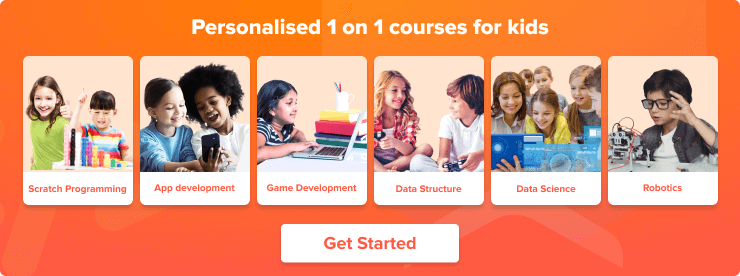
This “snap together” approach is what makes block coding so powerful for beginners. Students get real wins fast, make fewer frustrating errors, and learn genuine programming logic from day one.
🔷 What Are Coding Blocks? (The “Puzzle Pieces” of Programming)
| Coding Block Type | What It Does | Example |
| Move | Controls character movement | Move 10 steps |
| Repeat | Loops an action multiple times | Repeat 5 times |
| If/Then | Makes decisions based on conditions | If touching the wall, bounce |
| Score | Tracks and updates game variables | Change score by 1 |
| Say | Creates character dialogue | Say “Hello!” for 2 seconds |
| Play Sound | Adds audio to the project | Play sound “meow” |
🏆 Pro Tip for Parents: Show your child a physical jigsaw puzzle and explain that coding blocks work the same way – each piece has a specific shape and purpose, and they only connect in ways that make logical sense.
🚀 How Coding Blocks Help Beginners Learn Faster
| Barrier | The Problem | How Block Coding Fixes It |
| Syntax Stress | One missing comma or bracket breaks everything | Blocks are pre-written – no typos possible |
| Abstract Logic | Loops and conditions are hard to visualize | Blocks make the structure physically visible |
| Slow Feedback | Errors take time to find and fix | Press play and see results instantly |
✅ Barrier 1: No Syntax Stress
In block coding, every command is pre-written and pre-formatted. Students drag, drop, and snap – no typos, no forgotten brackets, no semicolons. The focus stays entirely on logic and creativity.
👁️ Barrier 2: Visual Logic
The structure of the program is physically visible. Students can see at a glance that the repeat block wraps around other blocks and that the if-then block creates a decision point – making abstract concepts genuinely tangible.
⚡ Barrier 3: Instant Feedback
Press the green flag, and the program runs immediately. Students experiment freely, fix problems quickly, and improve their project in a continuous, satisfying cycle.
💡 Fun Fact: This rapid feedback loop is the same principle used in professional software development methodologies like Agile – block coding teaches this mindset from day one!
⚡ Block Coding vs. Text Coding
Comparison 1 – Move a Sprite Forward
| Block Coding (Scratch) | Text Coding (Python) | |
| What it looks like | 🟦 [Move 10 steps] | sprite. Move(10) |
| What the student does | Drags and drops a pre-made block | Type the command from memory |
| Error risk | Zero | High – one typo breaks everything |
| Time to learn | Under 5 minutes | Several hours of practice |
Comparison 2 – Make a Sprite Talk
| Block Coding (Scratch) | Text Coding (JavaScript) | |
| What it looks like | 🟪 [Say “Hello!” for 2 seconds] | console.log(“Hello!”); |
| What the student does | Types into a pre-built dialogue box | Writes syntax from memory |
| Error risk | Zero | High – missing quotes break the code |
| Learning curve | Immediate | Requires syntax memorization first |
Comparison 3 – Repeat an Action (Loops)
| Block Coding (Scratch) | Text Coding (Python) | |
| What it looks like | [Repeat 10] [Move 10 steps] | for i in range(10): sprite. Move(10) |
| What the student does | Wraps one block inside another visually | Write a for-loop with correct indentation |
| Concept clarity | Immediately obvious | Abstract – requires understanding indentation |
| Best for | All beginners | Students with prior coding experience |
🏆 Pro Tip for Students: Every loop, condition, and variable you learn in block coding transfers directly into Python, JavaScript, and every other language you will ever use. The logic is identical – only the interface looks different.
🐱 Coding Blocks in Scratch (The Most Common Starting Point)
Scratch organizes its coding blocks into clearly color-coded categories.
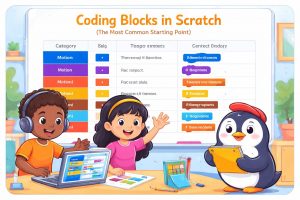
Here is what each one does:
| Category | Color | What It Controls | Example Blocks |
| Motion | 🔵 Blue | Movement and positions | Move 10 steps. Turn 15 degrees. Go to x:0 y:0 |
| Looks | 🟣 Purple | Costumes and dialogue | Say “Hello!” Switch costume. Change size |
| Sound | 🟠 Orange | Effects and music | Play sound “meow.” Change volume. Stop all sounds |
| Control | 🟡 Yellow | Loops and timing | Repeat 10. Forever. Wait 1 second. If/then/else |
| Events | 🟤 Brown | Clicks and key presses | When the flag is clicked. When the space key is pressed |
| Sensing | 🩵 Light Blue | Detection and conditions | Touching the wall? Mouse pressed? Distance to sprite |
| Variables | 🟠 Orange-Red | Score, lives, and data | Set score to 0. Change score by 1 |
🎯 Challenge for Students: Open Scratch today and use one block from each category in a single project. It does not need to be perfect – just get all seven types working together. This is the fastest way to understand how coding blocks connect!
What Students Can Build with Block Coding
🌟 Grades 1–3: First Wins with Block Coding
| Project | What It Teaches | Time to Build | Difficulty |
| Interactive story card | Events, looks, sequencing | 20–30 minutes | ⭐ |
| Animated character with sound | Motion, sound, timing | 20–30 minutes | ⭐ |
| Click-to-change color game | Events, looks, interaction | 15–25 minutes | ⭐ |
🎮 Grades 4 – 5: Coding Blocks for Games with Scores
| Project | What It Teaches | Time to Build | Difficulty |
| Clicker game | Variables, events, score tracking | 30–45 minutes | ⭐⭐ |
| Quiz game | Conditions, branching, feedback | 30–45 minutes | ⭐⭐ |
| Simple maze game | Motion, sensing, collision | 40–60 minutes | ⭐⭐ |
🔥 Grades 6–8: Real Game Logic with Conditions and Variables
| Project | What It Teaches | Time to Build | Difficulty |
| Chase game | Sensing, motion, live interaction | 45–60 minutes | ⭐⭐⭐ |
| Platformer mini level | Gravity, jumping, and collision | 50–70 minutes | ⭐⭐⭐ |
| Pong-style game | Two-player logic, speed, and scoring | 60–75 minutes | ⭐⭐⭐ |
🚀 Grades 9–10: Advanced Block Coding Systems
| Project | What It Teaches | Time to Build | Difficulty |
| Multi-level adventure game | Level progression, state management | 60–90 minutes | ⭐⭐⭐⭐ |
| Timer and power-ups game | Advanced variables, timed conditions | 60–90 minutes | ⭐⭐⭐⭐ |
| Basic leaderboard using variables | Data storage and display logic | 75–90 minutes | ⭐⭐⭐⭐ |
💻 Grades 11–12: Bridge from Block Coding to Text Coding
| Project | What It Teaches | Time to Build | Difficulty |
| Scratch Programming with AI | Full project planning and execution | 90–120 minutes | ⭐⭐⭐⭐⭐ |
| Block-to-Python logic mapping | Translating visual logic to text syntax | 60–90 minutes | ⭐⭐⭐⭐⭐ |
| Functions-style thinking in blocks | Modularity and reusable code concepts | 60–90 minutes | ⭐⭐⭐⭐⭐ |
🗺️ Quick Project Menu
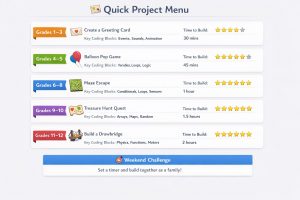
Every great coder starts with one project. Find the perfect starting point below – then open Scratch and get building right now. No preparation needed. Just a browser and a great idea.
| Grade Group | Project Idea | Key Coding Blocks | Time to Build | Challenge Level |
| 1–3 | Animated Greeting Card | Events, looks, sound | 20–30 minutes | ⭐ |
| 4–5 | Balloon Clicker Game | Events, variables, score | 30–45 minutes | ⭐⭐ |
| 6–8 | Escape Maze | Sensing, motion, conditions | 45–60 minutes | ⭐⭐⭐ |
| 9–10 | Multi-Level Adventure | Variables, conditions, levels | 60–90 minutes | ⭐⭐⭐⭐ |
| 11–12 | Capstone and Text Bridge | Logic to text mapping | 90–120 minutes | ⭐⭐⭐⭐⭐ |
🎯 Weekend Challenge for Families: Pick the project that matches your child’s grade, set a timer, and build it together this weekend. Share the finished project with a friend or family member – the pride on your child’s face when someone plays their game is genuinely priceless.
🛠️ Popular Block Coding Tools for Kids
Choosing the right block coding tool makes all the difference between a child who loves coding and one who gives up after day one. Use the table below to find the perfect fit — one tool is all your child needs to get started.
| Tool | Best For | Grade Group | Key Strength | Cost | Device |
| Scratch | All-round block coding | Grades 1–12 | Huge variety – games, animations, stories | Free | Browser |
| ScratchJr | Youngest beginners | Grades 1–3 | Simplified blocks, no reading required | Free | iPad and Android |
| Code.org | Structured learners | Grades 1–8 | Clear curriculum path, school-aligned | Free | Browser |
| Microsoft MakeCode | Minecraft and hardware fans | Grades 4–10 | Works inside Minecraft and on BBC micro: bit | Free | Browser and device |
| Blockly | Logic-focused learners | Grades 5–12 | Google-built, pure logic, great text transition prep | Free | Browser |
| Tynker | Template-based builders | Grades 2–8 | Polished templates, fast wins, strong motivation | Free and paid | Browser |
| LEGO SPIKE and WeDo | Hands-on robotics learners | Grades 2–8 | Block code controls real LEGO robots | Paid (hardware required) | Tablet and computer |
| Swift Playgrounds | Students are ready to transition | Grades 9–12 | Bridges block puzzles into real Swift code | Free | iPad and Mac |
| Codingal | Students who learn best with live guidance | Grades 1–12 | Structured project-based classes with live expert teachers | Paid with a free trial | Browser |
Not sure which tool to pick? Use this quick decision guide:
| Choose… | If your child is… |
| ScratchJr | Under 7 years old |
| Scratch | A complete beginner at any age |
| Code.org | A structured learner who likes guided lessons |
| Microsoft MakeCode | Obsessed with Minecraft |
| LEGO SPIKE or WeDo | Interested in building real robots |
| Swift Playgrounds | Ready to move toward real coding languages |
| Codingal | Getting frustrated learning alone |
| Tynker | Motivated by fast, professional-looking results |
| Blockly | Focused on understanding core logic deeply |
Final Thoughts
Block coding is not a simplified version of real programming – it is real programming with a beginner-friendly interface. Every loop, condition, variable, and event that students learn through coding blocks is the same thinking used by professional developers building the apps, games, and systems that power the modern world.
Start with one small project. Build it, test it, improve it, and share it. Then build the next one. Block coding gives every student the confidence to begin that journey on day one – without fear, without frustration, and without needing to know everything before they start.
🎯 Ready to Start Building?
Want your child to learn block coding with expert guidance? Book a free trial classes and watch them build a real project using coding blocks with a live expert teacher – step by step, block by block, from day one.
Frequently Asked Questions
- What is block coding?
Block coding is a beginner-friendly way to program using drag-and-drop blocks instead of typing. Each block represents a real command, like move, repeat, or if/then. It helps students learn logic, sequencing, and debugging quickly without worrying about syntax errors or typos. - What are coding blocks?
Coding blocks are visual instructions that snap together like puzzle pieces to form a program. Each block performs one action, such as moving a character, playing a sound, or checking a condition. Blocks only fit in valid ways, so beginners build correctly and learn faster. - Is block coding real coding?
Yes, block coding is real coding because it teaches the same logic used in text programming: sequencing, loops, conditions, variables, and debugging. The difference is the format—blocks replace typing with visuals. Many students start with blocks and later transition smoothly to Python or JavaScript. - Which grade should start with block coding?
Most students can start block coding in Grades 1–3 with simple animations and stories. Grades 4–5 are ideal for games with rules and scores. By Grades 6–8, students can handle conditions and variables. Older grades can build advanced projects and prepare for text coding. - Is Scratch block coding?
Yes, Scratch is a popular block coding platform where students create games, animations, and stories using coding blocks. It’s beginner-friendly, works well for Grades 1–12 depending on the project’s complexity, and helps students understand core coding concepts such as events, loops, variables, and conditions. - Block coding vs text coding: which is better for beginners?
Block coding is usually better for beginners because it removes syntax errors and lets students focus on logic. Text coding offers more control but can feel frustrating early due to typing rules. A great path starts with blocks, then switching to Python or JavaScript later. - What can students build with block coding in school?
Students can build interactive stories, animations, quizzes, clicker games, maze games, and simple platformers using block coding. Older students can create multi-level adventures with timers, scores, and power-ups. These projects teach problem-solving, creativity, and debugging while staying fun and classroom-friendly. - What are the best block coding tools for kids?
Top block coding tools include Scratch, ScratchJr (Grades 1–3), Code.org (guided learning), Microsoft MakeCode (Minecraft and hardware), Tynker (templates), and LEGO SPIKE (robotics). The best choice depends on the child’s grade, interest, and whether they prefer structure or creativity. - How long does it take to learn block coding?
Most students learn basic block coding in a few sessions – often within 2–4 weeks of consistent practice. They can build simple animations quickly, then progress to games with loops, variables, and conditions. Mastery takes longer, but confidence and real project-building can start immediately. - How do students move from block coding to Python/JavaScript?
Students move from block coding to Python or JavaScript by translating the same logic into typed code. Start with familiar concepts – events, loops, conditions, and variables – then practice reading short code snippets. Tools like Make Code also show blocks and JavaScript together, making the transition easier.