Table of Contents
How to Code a Game: What It Really Means Best Tools to Code a Game How to Make Easy Games Quick Game Ideas Kids Can Build Core Coding Concepts Kids Learn When They Code a Game Coding Languages for Video Games The "30-Day Code a Game" Challenge Final Thoughts Frequently Asked Questions
How to code a game is one of the most exciting, confidence-building skills a young learner can develop today – and the moment a child looks at a game on screen and realizes, “I made this myself!” is truly priceless. The best part? You do not need to be a tech genius to get started. In this guide, we will walk you – and your child – through everything needed to code a game from zero, using free tools, simple steps, and plenty of fun along the way. By the end, your child will not just play games – they will proudly build one.
💡 Fun Fact: The first video game ever created was called Tennis for Two, built in 1958 by a physicist named William Higginbotham – using an oscilloscope, not a computer! Today, kids can build games in under 30 minutes using free tools on a browser.
How to Code a Game: What It Really Means
Here is a truth that surprises most beginners: a game is not magic. At its core, every game — from Minecraft to a simple quiz — is made of just three things:
| Game Element | What It Means | Simple Example |
| Rules | What can and cannot happen | “If you fall off the edge, you lose a life.” |
| Interaction | What happens when the player does something | “Press space to jump.” |
| Feedback | How the game responds to the player | “The score increases by one when you collect a coin.” |
That is it. Rules, interaction, and feedback. When kids understand this, the idea of how to code a game suddenly feels very achievable – because it is.
Kids as young as six are coding games today using block-based tools that require absolutely no typing. Older kids can graduate to text-based languages when they are ready for more creative control. Either way, the logic is exactly the same.
🟦 Code a Game with Blocks vs. Text
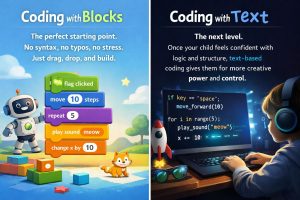
🟩 Blocks = The perfect starting point. No syntax, no typos, no stress. Just drag, drop, and build.
🟦 Text = The next level. Once your child feels confident with logic and structure, text-based coding gives them far more creative power and control.
🏆 Pro Tip for Parents: Do not rush to text-based coding. Confidence built through blocks transfers beautifully to text-based languages later. Start where success feels easy.
🛠️ Best Tools to Code a Game
Choosing the right tool is half the battle when learning how to code a game. The biggest mistake parents make is introducing three or four tools at once — which leads to confusion and frustration. Pick one tool, stick with it, and let your child build something they are proud of before switching.
Here is a simple guide to help you choose:
| Tool | Best For | Age Range | Cost | Requires Download? |
| Scratch | First-time builders | Ages 6 and above | Free | No |
| Code.org | Structured learners | Ages 6 and above | Free | No |
| Tynker | Template-based builders | Ages 7 and above | Free and paid | No |
| Roblox Coding For Kids | Older, ambitious builders | Ages 12 and above | Free | Yes |
| Unity | Teen developers | Ages 14 and above | Free | Yes |
⭐ Scratch
Scratch is the undisputed champion for beginners who want to code a game for the first time. It uses colorful drag-and-drop blocks, works entirely in a browser, and has a huge community where kids can share and play each other’s games. Zero cost. Zero downloads. Maximum fun.
💡 Fun Fact: Over 100 million people have created projects on Scratch. Your child is joining one of the world’s largest creative coding communities!
📘 Code.org
Code.org feels less like a coding lesson and more like a puzzle game – which is exactly why kids love it. Every lesson is structured, clear, and celebrates small wins along the way. It is the ideal choice for children who prefer guidance over open-ended exploration.
🎮 Tynker
Tynker gives kids a head start by providing polished game templates they can customize and build upon. For kids who get frustrated starting from a blank screen, Tynker is a fantastic confidence booster that produces professional-looking results quickly.
🌍 Roblox Studio and Unity
These platforms are for older kids and teenagers who are ready to invest serious time into learning how to code a game in three dimensions. The learning curve is steeper, but the results — fully immersive, realistic game worlds — are worth every effort.

🏆 Pro Tip for Students: Before jumping into Roblox Studio or Unity, make sure you have already built at least two or three complete games in Scratch. The logic you learn there carries directly into these advanced platforms.
🎯 How to Make Easy Games
Here is the golden rule of learning how to code a game: build a playable version first, make it perfect later.
Most beginners try to build their dream game on the very first attempt — and give up halfway through. The secret that professional game developers use is called version thinking: build version one fast, then improve it one step at a time.
Follow these five steps and your child will have a real, playable game faster than you think:
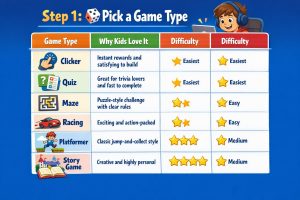
Step 1: 🎲 Pick a Game Type
| Game Type | Why Kids Love It | Difficulty |
| Clicker | Instant rewards and satisfying to build | ⭐ Easiest |
| Quiz | Great for trivia lovers and fast to complete | ⭐ Easiest |
| Maze | Puzzle-style challenge with clear rules | ⭐⭐ Easy |
| Racing | Exciting and action-packed | ⭐⭐ Easy |
| Platformer | Classic jump-and-collect style | ⭐⭐⭐ Medium |
| Story Game | Creative and highly personal | ⭐⭐⭐ Medium |
🏆 Pro Tip: The best first game is the one your child can explain in one sentence. If they cannot describe it simply, it is probably too complex for version one.
Step 2: 🏗️ Build the First Playable Version
Keep it as simple as possible:
- One character — just one, nothing else yet
- One goal — reach the flag, collect the coin, or answer the question
- One rule — win or lose, nothing in between
If your child has a working, playable game within the first five minutes of building — even a rough one — they are doing it exactly right.
Step 3: ➕ Add Rules
Rules are what turn a blank project into a real game. Here are some beginner-friendly rules to try:
- ✅ If you touch the coin → the score increases by one
- ✅ If you touch the wall → lose a life
- ✅ If the timer reaches zero → game over
- ✅ If the score reaches ten → level up
💡 Fun Fact: Every single video game in the world — from simple mobile apps to massive open-world adventures — is built on if-then rules exactly like these.
Step 4: 🐛 Test and Debug
This step is where real learning happens. Teach your child the “Break It on Purpose” method:
- Try to make the game do something it should not do
- Find where the problem is coming from
- Fix one bug at a time
- Test again after every single fix
- Celebrate each improvement — no matter how small
🏆 Pro Tip for Kids: Bugs are not failures. Every bug you find and fix makes you a better coder. Even the world’s best developers spend a large part of their time debugging!
Step 5: 🚀 Upgrade
Now the real fun begins. Add one upgrade at a time:
- 🎯 A second level with a new challenge
- ⏱️ A countdown timer to create pressure
- ⚡ A power-up that gives the player a boost
- 👾 A harder enemy that moves faster
⚠️ Parent Alert: Resist the urge to add everything at once. One upgrade per session keeps kids excited, focused, and motivated to keep coming back.
🗺️ Quick Game Ideas Kids Can Build
Every great coder needs a mission. Help your child choose theirs from the table below — and then watch them get to work!
| Game Idea | Best For | Tool to Use | Time to Build | Challenge Level |
| Clicker “Coin Collector” | Beginners | Scratch | 30–45 minutes | ⭐ |
| Quiz “Guess the Animal” | Trivia lovers | Scratch or Code.org | 30–60 minutes | ⭐ |
| Maze “Escape Room” | Puzzle fans | Scratch | 45–90 minutes | ⭐⭐ |
| Racing “Dodge the Cones” | Action kids | Scratch | 60–90 minutes | ⭐⭐ |
| Platformer “Jump Quest” | Gamers | Scratch or Tynker | 90–120 minutes | ⭐⭐⭐ |
🎮 Weekend Challenge for Families: Pick one game from the table above, set a timer for 45 minutes, and build version one together as a family. No pressure, no perfection — just build, test, and laugh at the bugs together!
🧠 Core Coding Concepts Kids Learn When They Code a Game
Every time a child sits down to code a game, they are quietly learning the exact same concepts that professional software engineers use every single day. Here is what is really happening under the hood:

Here is what is really happening under the hood:
⚡ Events
What it is: An event is any action that triggers something in the game.
Real examples:
- Press the space bar → the character jumps
- Click the screen → collect a coin
- Move the mouse → the character follows
💡 Fun Fact: Every app on your phone — every tap, swipe, and press — is powered by events, just like the ones kids learn when they code a game in Scratch!
🔁 Loops
What it is: A loop repeats an action over and over without requiring the same instruction to be rewritten.
Real examples:
- An enemy that moves back and forth across the screen
- A background that scrolls continuously
- An animation that cycles on repeat
🔀 Conditions
What it is: Conditions are the decision-makers of every game.
Real examples:
- If the player touches an obstacle → lose a life
- If the score reaches fifty → unlock the next level
- If the timer reaches zero → the game over screen appears
📊 Variables
What it is: Variables store information that changes during gameplay.
| Variable Type | What It Tracks | Example |
| Score | Points collected | Score = 42 |
| Lives | How many tries remain | Lives = 3 |
| Timer | Time remaining | Timer = 00:15 |
| Health | Player strength | Health = 80% |
🐞 Debugging
What it is: Debugging means finding and fixing errors in your code.
The three-step debug method:
- 🔍 Identify — where exactly is the problem happening?
- 🔧 Fix — change one thing at a time
- ✅ Test — run the game again to confirm the fix worked
🏆 Pro Tip for Students: Keep a “Bug Journal” — a simple notebook where you write down every bug you find and how you fixed it. You will be amazed at how quickly your problem-solving skills grow!
💻 Coding Languages for Video Games
When kids start researching how to code a game more seriously, one question comes up almost immediately: Which programming language do I need to learn? The answer depends entirely on what kind of game you want to build and where you want it to run.

The most important rule: learn one language well before jumping to another. Depth beats breadth every single time.
Here is a clear breakdown to help you and your child choose the right path:
| Language | Best For | Difficulty | Used In |
| Python | Beginners and prototypes | ⭐ Easiest | Small games and learning logic |
| JavaScript | Browser games | ⭐⭐ Easy | Web-based games |
| Lua | Game scripting | ⭐⭐ Easy | Roblox and game engines |
| C# | Two-dimensional and three-dimensional engine games | ⭐⭐⭐ Medium | Unity engine |
| C++ | High-performance games | ⭐⭐⭐⭐ Hard | Professional game studios |
🐍 Python
Python’s clean, readable syntax makes it the most beginner-friendly language for learning how to code a game from scratch. It is perfect for building small games, testing creative ideas, and understanding the core logic of programming before moving to more complex tools.
🌐 JavaScript
JavaScript runs directly in any web browser without requiring downloads or installations, making it one of the most accessible languages for young developers. It is ideal for kids who want to build games that friends and family can play instantly by clicking a link.
🎮 Lua
Lua is a lightweight scripting language that powers the game logic in platforms like Roblox. If your child is already building in Roblox Studio, they are already learning Lua — and the skills transfer well to other game engines and platforms.
🏗️ C#
C# is the primary language used in Unity, one of the world’s most popular game development engines. It is significantly more approachable than C++ while still being powerful enough to build professional-quality games in both two and three dimensions.
⚡ C++
C++ is one of the most powerful languages in the entire gaming industry, used by major game studios to build high-performance titles. It is best reserved for advanced learners who already have a solid foundation in at least one other language.
💡 Fun Fact: Some of the world’s most popular games — including Fortnite, Call of Duty, and World of Warcraft — were built using C++. Every expert started as a complete beginner!
🌟 The “30-Day Code a Game” Challenge
Want to turn this guide into an action plan? Here is a simple four-week challenge for kids and families:
| Week | Mission | Goal |
| Week 1 | Pick a tool and explore | Get comfortable with Scratch or Code.org |
| Week 2 | Build version one | Finish one simple, playable game |
| Week 3 | Add one upgrade per day | Timer, score, new level, or power-up |
| Week 4 | Share and celebrate | Show the finished game to friends and family |
🏆 Family Challenge: Print this table and stick it on the fridge. Let your child tick off each week as they complete it. The sense of achievement when they reach Week 4 is genuinely priceless.
Final Thoughts
Learning how to code a game is not about being the smartest kid in the room or having the fanciest equipment. It is about starting small, staying curious, and never being afraid of a bug or two along the way. Every game developer in the world — from indie creators to the teams behind the biggest titles — began exactly where your child is beginning right now: with a blank screen, a simple idea, and the courage to press play.
So pick one tool. Choose one game idea. Build version one. Then improve it, one small upgrade at a time. The skills your child builds when they code a game today will stay with them for a lifetime — far beyond any single project or platform.
Ready to Get Started?
Ready to help your child make their first game? Free Scratch Trial Class and watch them build a fun game step-by-step with a live expert teacher.
Frequently Asked Questions
- How to code a game for beginners?
The best way to code a game as a beginner is to start with Scratch, choose a simple game type like a clicker or quiz, and focus on building one playable version before adding any extras. Keep the rules simple, test often, and celebrate every small win along the way. - What is the easiest way to code a game?
The easiest way to code a game is to use a block-based platform like Scratch, which requires no typing and teaches logic through drag-and-drop building. Start with a clicker or maze, keep it to one character and one rule, and finish a complete version before improving it. - Can kids code a game without typing?
Absolutely. Block-based platforms like Scratch and Code.org allow children as young as six to code a game using visual drag-and-drop blocks — no typing required. These tools teach all the same logic and problem-solving skills as text-based coding, just in a far more accessible format. - How long does it take to code a game?
A simple beginner game can be built in as little as 30 to 45 minutes using Scratch. More complex games with multiple levels, timers, and power-ups may take several sessions spread across a few days. The key is finishing version one quickly and improving it gradually over time. - What language should I learn to code a game?
Start with Python if you want to learn programming logic, JavaScript if you want to build browser games, or Lua if your child already uses Roblox. Once comfortable with one language, moving to C# for Unity or C++ for advanced development becomes significantly more manageable. - Is Scratch good to code a game?
Yes, Scratch is one of the best platforms available for beginners who want to code a game for the first time. It is completely free, requires no downloads, uses visual blocks instead of typing, and allows kids to publish and share their finished games with a global community instantly. - What should I build as my first game?
Your first game should be as simple as possible. A clicker, quiz, or maze game is ideal because they have fewer characters, fewer rules, and can be completed in a single session. Choose a type you can describe in one sentence and focus entirely on finishing a playable version before adding anything extra. - How do I fix bugs when I code a game?
When you code a game and encounter a bug, use the three-step method: identify exactly where the problem is happening, fix one thing at a time, and test again after every single change. Deliberately trying to break the game is one of the most effective ways to discover hidden problems early. - Can I code a game for free?
Yes, you can code a game completely for free using platforms like Scratch, Code.org, and Tynker. All three tools work in any browser, require no downloads or subscriptions, and provide everything a beginner needs to build, test, and share a fully playable game from day one. - How do I make my game more fun?
After finishing version one, add one upgrade at a time — a countdown timer, a new level, a power-up, or a faster enemy. Ask friends and family to play it and observe where they get confused or lose interest. Player feedback is the most powerful tool for making any game genuinely more fun and engaging.